
What LM Studio Actually Does Well
LM Studio is a desktop GUI for running open-weight models locally. Download a model, pick your quantisation, and you’re either chatting or hitting a local API endpoint. It supports a wide range of GGUF models, has a clean interface, and exposes an OpenAI-compatible local server.
For individual developers exploring models, it’s genuinely good. No cloud dependency, no API keys, no per-token billing. You can have Llama 3 8B running on your MacBook in under ten minutes.
That’s also roughly where it stops. LM Studio is a single-machine, single-user tool built for experimentation, not deployment.
Where LM Studio Falls Short
Push LM Studio beyond your own machine and the gaps become obvious fast.
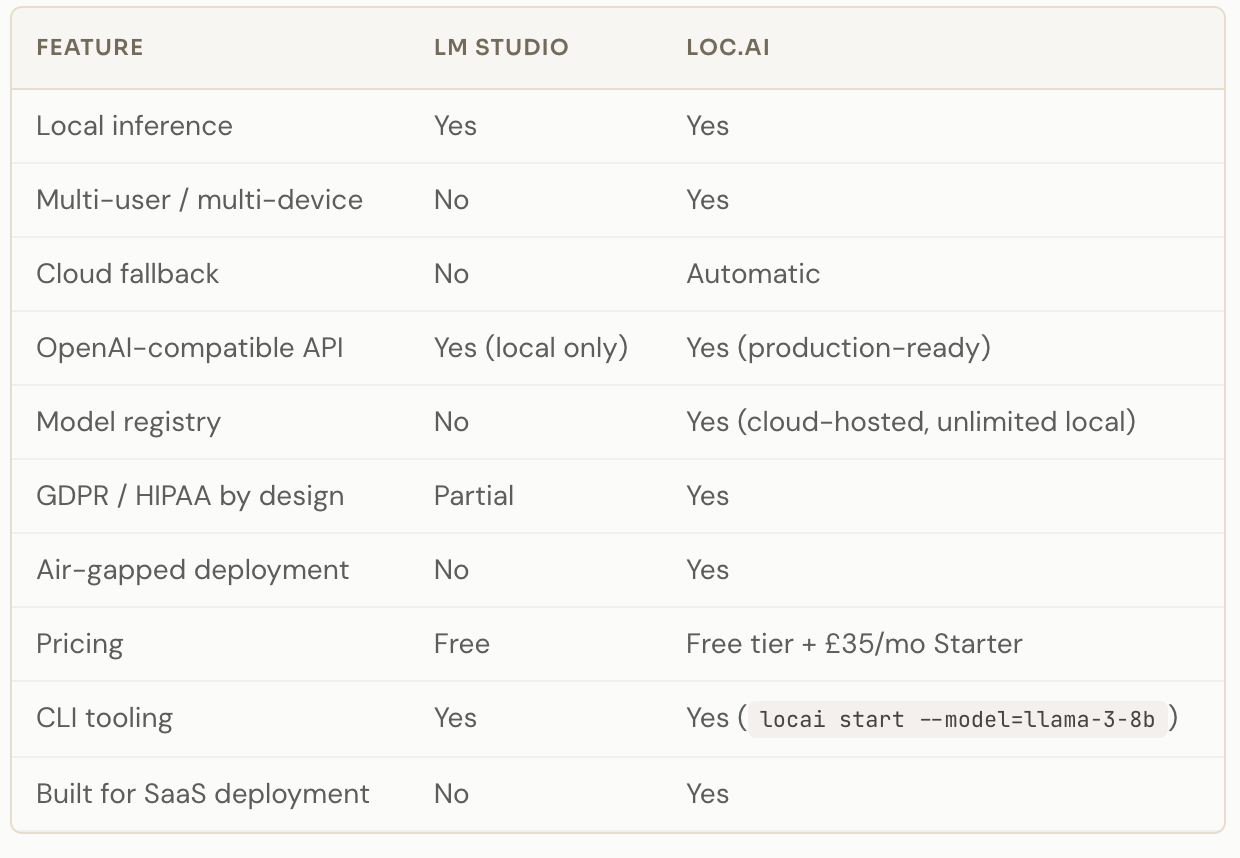
No multi-user or multi-device support. LM Studio runs on one machine. You can’t route your users’ inference through your developer laptop, and expecting each user to run their own LM Studio setup is not a product architecture.
No cloud fallback. If a device doesn’t have enough compute to run the model, LM Studio fails. There’s no automatic routing to a cloud endpoint. You handle that yourself, or you don’t handle it at all.
No infrastructure management. No model registry, no deployment tooling, no orchestration across nodes. It’s a local app, not infrastructure.
Not designed for teams. No seats, no access controls, no shared environments. It’s a personal developer tool.
If you’re a solo developer experimenting locally, none of this matters. If you’re shipping an AI product, all of it does.
The LM Studio Alternative Landscape in 2026
Several tools compete in the local inference space. Here’s how the main ones stack up.
Ollama
Ollama hit 52 million monthly downloads in Q1 2026, which tells you how much demand exists for local inference that actually works. It’s CLI-first, easy to pick up, and you can run a model in one command. Like LM Studio, though, it’s a single-machine tool with no cloud fallback and no production deployment features. Great for developers. Not built for shipping to users.
LocalAI
LocalAI has 44,000 GitHub stars and broad model support. It’s OpenAI-compatible and more configurable than LM Studio. The tradeoff is complexity. You manage model deployment, GPU allocation, and scaling yourself, with no automatic fallback when local resources run out. If you have a DevOps team and want full control, it’s worth evaluating. If you want to move fast without infrastructure overhead, the setup cost is steep.
vLLM
vLLM is built for high-throughput inference in server environments, using PagedAttention to handle concurrent requests efficiently. In practice, it’s known for CUDA out-of-memory errors under load, a steep learning curve, and complex production deployment. No cloud fallback, no hybrid routing. It’s a serious tool for serious infrastructure teams, not a drop-in for most SaaS builders.
Cloud alternatives: Together AI, Fireworks AI, RunPod
If local inference isn’t the requirement, these providers offer fast, competitive cloud inference. Per-token pricing works fine at low volumes. At scale, costs become unpredictable. None of them offer on-premise or air-gapped deployment, which rules them out for regulated industries.
Where Locai Fits
Locai sits in a different position from all of the above. It’s not a desktop app. It’s not a self-hosted server you manage. It’s edge AI infrastructure that routes model inference from cloud servers to end-user devices, with automatic fallback to cloud when a device can’t handle the load.
The practical difference: when a user opens your app, inference runs on their device. You don’t pay for that compute. If their device can’t handle it, locai routes to cloud automatically. You don’t write that logic — it’s built in.
Migrating from an existing OpenAI API integration takes a single line of code change. The API is OpenAI-compatible, so your existing code works without rewriting.
The cost angle
If you’re paying £5,000 to £50,000 per month in cloud inference bills, the math on edge routing is significant. Running inference on end-user devices rather than cloud APIs can cut costs by up to 95%. That’s not a theoretical number — it’s what happens when you stop paying per token for compute your users already own.
LM Studio doesn’t touch this problem. It runs on your machine, not your users’ machines. The cost structure doesn’t change.
The compliance angle
For regulated industries — healthcare, finance, legal, defence — the question isn’t just cost. It’s whether data can leave the device at all. With locai, prompts stay local by design. The model runs on the user’s hardware. GDPR and HIPAA compliance isn’t a configuration layer; it’s the default behaviour. Fully air-gapped and on-premise deployment is supported.
LM Studio does offer local processing, but it’s a personal tool, not an enterprise deployment architecture. You can’t push it to a fleet of devices, manage model versions centrally, or enforce data residency policies across an organisation.
Head-to-Head Comparison
When to Use LM Studio
LM Studio is the right call when you’re exploring models on your own machine and have no intention of deploying anything. It’s fast to set up, free, and does exactly what it says. Prototyping, benchmarking, building something just for yourself — it’s a solid choice for all of that.
When to Use Something Else
If any of the following apply, LM Studio isn’t the right fit:
-
You’re shipping an AI product to users
-
Your inference costs scale with your user base
-
You need GDPR, HIPAA, or data sovereignty compliance
-
You need cloud fallback when devices can’t handle the load
-
You need to manage model deployment across multiple devices or seats
For the first four, locai is worth a look. The free Developer tier includes 3 end nodes, 5GB model registry, and no credit card required. The Starter plan at £35 per month includes a 30-day free trial and scales to 15 nodes with pay-as-you-go overages. Run locai start --model=llama-3-8b and you can have something working in minutes.
The infrastructure is backed by Google for Startups and the NVIDIA Inception Program, which is worth knowing if production reliability is part of your evaluation.
FAQs
Is LM Studio suitable for production AI applications?
No. LM Studio is a single-machine desktop tool designed for individual developers experimenting locally. It has no multi-user support, no cloud fallback, and no infrastructure management. Production deployment needs something built for that purpose.
What is the best LM Studio alternative for SaaS developers?
It depends on your constraint. If cost is the problem, locai routes inference to end-user devices and can cut cloud bills by up to 95%. If you want more control over a self-hosted server, LocalAI or vLLM are options — though both require significant DevOps effort. Ollama is simpler but also single-machine only.
Can locai replace an OpenAI API integration without rewriting code?
Yes. locai uses an OpenAI-compatible API, so migrating from an existing OpenAI integration requires a single line of code change. Your existing API calls work without modification.
How does locai handle devices that can’t run the model locally?
It automatically falls back to cloud routing when a device lacks sufficient compute. You don’t write this logic yourself — the fallback is built into the infrastructure, so your application stays reliable regardless of the end user’s hardware.
Is locai compliant with GDPR and HIPAA?
Yes, by design. Prompts and data stay on the user’s device. Nothing is sent to external servers during local inference. locai also supports fully air-gapped and on-premise deployment for regulated industries where data cannot leave the network under any circumstances.
What models does locai support?
locai upports Llama 3 8B and other open models via CLI. Start a model with locai start --model=llama-3-8b. The Model Registry stores models in the cloud with unlimited local storage on deployed devices.
How does locai pricing compare to per-token cloud billing?
Cloud providers charge per token, so costs scale directly with usage. locai uses flat-rate infrastructure pricing: a free Developer tier, a Starter plan at £35 per month, and pay-as-you-go overages at £5 per device per month. When inference runs on end-user devices, the per-token cost for those requests drops to effectively zero.